
I have Comcast HD service, and I have to "respond" to a set of commercials they are running. Comcast claims to have three times the HD programming than satellite. Though this is not a lie, it's certainly is stretching the truth.
Channels:
Comcast = 27
DirectTV = 47
Dish Network = 34
These are the counts for basic HD service and does not include Premium HD. Comcast offers Cinemax and Starz in HD, the satellite providers also offer HBO and Showtime. If you actually review the HD channel selection for all three providers, you will find that the base set includes allot of fluffy channels that no one really wants, but it's pretty uniform.
The big problem with the channel selection is that Comcast just added Discovery for HD, whereas the satellites include Animal Planet, Science Channel, and History Channel.
So how can Comcast have three time more HD programming?
The answer is in the fine print. "Comcast offers three times more HD view options than satellite." Here how it works. Comcast has a fiber backbone with a hundreds of times the bandwidth of satellite. This means they can throw allot of bandwidth at OnDemand programming. As of 2 January, 2008, Comcast had 181 HD OnDemand selections. Add 140 to 27, you get 167. Divide that by 40, you get four to one. Factor the limited satellite on OnDemand and the number slides to three to one.
Now here's the fun part: Of Comcast's HD OnDemand, 40 selections are three minute music videos, 36 are five minute game reviews featuring cut scenes, an 19 others are vignettes of less than ten minutes each. If you were actually to sit down and watch all the HD OnDemand, back to back, it would require about 36 hours.
The Comcast claim is based upon two things: You watch less than 24 hours of programming a month and you really don't care what you watch during those 24 hours.
In the end, it looks like DirectTV has the best deal.
Until you factor in internet service.
Thursday, January 03, 2008

Sunday, December 23, 2007
Fedora 7 Kickstart
I needed to kickstart a system running Fedora 7, and discovered that the Rescue CD does not drop you to a boot: prompt to allow you to specify a kickstart directive. There are four options on the Grub menu:
* Install or upgrade
* Install or upgrade (text)
* Rescue installed system
* Boot from local drive
If you select one of the Install options, and press tab, you will be dropped to a prompt that will read:
> vmlinuz initrd=initrd.img
Add your kickstart directives and press enter:
> vmlinuz initrd=initrd.img ks=ftp://192.168.1.254/ks/adama.ka
Of course, I would recommend selecting the second option for text install, as it will rebuild the system faster.
* Install or upgrade
* Install or upgrade (text)
* Rescue installed system
* Boot from local drive
If you select one of the Install options, and press tab, you will be dropped to a prompt that will read:
> vmlinuz initrd=initrd.img
Add your kickstart directives and press enter:
> vmlinuz initrd=initrd.img ks=ftp://192.168.1.254/ks/adama.ka
Of course, I would recommend selecting the second option for text install, as it will rebuild the system faster.
Sunday, December 16, 2007
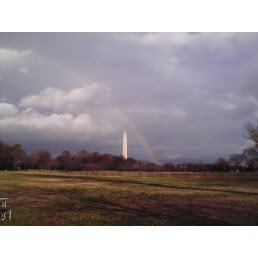
Washington Monument Rainbow
Saturday, December 01, 2007
...Except Holidays
I just noticed the hours at "Total Wine" in Chantilly, VA. Open 365 days a year. But wait! What does the fine print say? "Except Holidays"
Well, that would be less than 365 days, then.

Monday, November 26, 2007
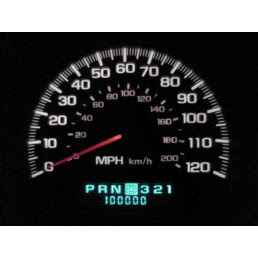
2000 Monte Carlo Turns 100,000
During my evening commute, my deer smashed Monte Carlo turned 100,000 miles old.
The sad part of this story is that I went to great effort to use my digital camera to make a video of the odometer rolling over, but something went horribly wrong. Now, admittedly, it would seem that watching a digital odometer "roll over" doesn't sound very exciting, but the video turned out pretty good... right up to the point that it stopped: ten seconds too soon! I guess videos had a 2 minute limit.
Tuesday, November 20, 2007
One Less Deer In Maryland
...At least that's my assessment. I hit her getting on to Highway 29 at about 0600 on my way to work. I came around the cloverleaf at between 40 and 50, was speeding up to merge into traffic, and checking my mirrors. By the time I looked forward, there was no time to react.
I don't know how she made it across the three lanes of traffic or whether she made it off the on-ramp. Just not the kind of thing you think about dealing with on a DC commute.
It's hard to see in the picture, but the right headlight unit (lights, turn signal, running lights) is shattered, hood is dented, and the nose cap has several cracks.

Friday, October 26, 2007
Beowulf: Everybody Needs One
Since my life is so simple and carefree, I decided I needed another project: build a Linux Beowulf Computational Cluster. It actually was easier than I thought. The tough part was retasking my hardware.
I set aside three matched systems to act as nodes. A fourth system is configured as the head. The cluster will be utilizing my standalone MySQL server and file server. I thought (incorrectly) that the head node would only be used as a control point, so it is my application server. This machine runs NIS, Bind, Apache, and Squid.
Starting point was Beowulf HowTo. It's rather old and out of date, but close enough to get things started. The single biggest factor is understanding that their is no beowulf-*.rpm it's lam-*.rpm. (Get it: wolf and lamb.) I didn't need to concern myself with NFS or NIS, as I already had those running.
Build a user, gen and distribute SSH keys. Here's a trick for that one. Since the user is going to be an NIS user, we put their home directory on the NFS server, and configure the nodes to auto mount the home directory.
Now, gen the keys, and assign the users public key to the authorized keys file.
I ignored all the MPI stuff, since I'm not doing C++ parallel computing. My goal is to be able to schedule Perl scripts across several machines. The benefit of using Beowulf for this rather than a bunch of crontabs, is that Beowulf will load balance the executions. Thus, the fastest node will be asked to execute the greatest number of incarnations of the script.
For the node configuration, two items of importance. First, disable iptables! Swendson emphasizes this fact, and yes you got to do it, or waste allot of time on rules. Besides, we're in a trusted environment. Second, the lamhosts file has moved. It is now /etc/lam/lamhosts.
Initialize the cluster with:
Yeah! Oh wait... It ran on the head node also. Not what I wanted.
Now for the real fun. Lets execute 10 runs, without concern for the target nodes.
since we can specify nodes as either n1-3 or n1,3, we have significant control over the processing capacity.
Man, that was easy.
I set aside three matched systems to act as nodes. A fourth system is configured as the head. The cluster will be utilizing my standalone MySQL server and file server. I thought (incorrectly) that the head node would only be used as a control point, so it is my application server. This machine runs NIS, Bind, Apache, and Squid.
Starting point was Beowulf HowTo. It's rather old and out of date, but close enough to get things started. The single biggest factor is understanding that their is no beowulf-*.rpm it's lam-*.rpm. (Get it: wolf and lamb.) I didn't need to concern myself with NFS or NIS, as I already had those running.
Build a user, gen and distribute SSH keys. Here's a trick for that one. Since the user is going to be an NIS user, we put their home directory on the NFS server, and configure the nodes to auto mount the home directory.
# ls -s /home/cluso /net/scully/home/cluso(Yes, I know I spelled Clouseau wrong.)
# chown cluso.cluso /home/cluso
Now, gen the keys, and assign the users public key to the authorized keys file.
$ ssh-keygen -t rsaSince our own key is trusted, and we get the same directory no matter where we login, our keys always allow us in.
$ cp id_rsa.pub authorized_keys
I ignored all the MPI stuff, since I'm not doing C++ parallel computing. My goal is to be able to schedule Perl scripts across several machines. The benefit of using Beowulf for this rather than a bunch of crontabs, is that Beowulf will load balance the executions. Thus, the fastest node will be asked to execute the greatest number of incarnations of the script.
For the node configuration, two items of importance. First, disable iptables! Swendson emphasizes this fact, and yes you got to do it, or waste allot of time on rules. Besides, we're in a trusted environment. Second, the lamhosts file has moved. It is now /etc/lam/lamhosts.
Initialize the cluster with:
lamboot -v lamhostsRead the output. It took several tries to get all the nodes to respond. Since we are not doing MPI I could not use mpirun. Instead, the command is:
$ lamexec hostname
baltar.terran.lan
c17.terran.lan
c18.terran.lan
c19.terran.lan
Yeah! Oh wait... It ran on the head node also. Not what I wanted.
$ lamexec n1-3 hostnameMuch better. One other small problem is an annoying message about MPI. Let's get rid of that.
c17.terran.lan
c18.terran.lan
c19.terran.lan
$ lamexec n1-3 hostname 2> /dev/null
Now for the real fun. Lets execute 10 runs, without concern for the target nodes.
]$ lamexec -np 10 hostname 2> /dev/null
baltar.terran.lan
c17.terran.lan
c18.terran.lan
c19.terran.lan
baltar.terran.lan
c17.terran.lan
c18.terran.lan
baltar.terran.lan
c19.terran.lan
c17.terran.lan
since we can specify nodes as either n1-3 or n1,3, we have significant control over the processing capacity.
Man, that was easy.
Monday, October 15, 2007
NH Rest Stop
This has got to be my favorite rest stop of all time. Above this Rest Area sign on I-93, is a small sign mentioning a state run liquor store is at this rest stop. Yes, a liquor store, at the rest stop, run by the state. Brilliant!

View Larger Map
What is truly amazing, however, were the prices-- 33% less than I pay in Maryland. Too bad I'm flying home.
Tuesday, October 09, 2007
"Do Not Push"
The tailgate of the dump truck says "Do Not Push". It was hard to resist pushing the truck full of dirt and rocks with my Chevy Monte Carlo, but some how I restrained myself.

Saturday, October 06, 2007
Xen and Fedora 7, Pt 2
There is another issue with Fedora 7. If you elect an interactive install via virt-manager, you do no have the option of a text based install. It must be graphical. Occasionally, however, these have failed.
The problem is one of memory allocation. Under Red Hat Enterprise Linux 5, you must specify more than 512M for an installation. Anything less results in a "not supported" error. On Fedora 7, virt-manager defaults to 500M. If you choose a lesser value, you are threading on thin ice.
There seems to be a sweet spot between 396M and 431M. With memory set to less than 448M, the installation warns that there is not much physical memory, and asks if it can eneable the swap partition for use by the installer. At 256M the system will freeze and the install fails. At 431M, the installation proceeds. Several attempts as 293M resulted in about 50% freezes.
Sorry to say I didn't bang away at it long enough to isolate the exact break point, but there is really no need. If you are critical on memory, and must do an interactive install (as opposed to kickstart), install at 448M, and bump down for production.
The problem is one of memory allocation. Under Red Hat Enterprise Linux 5, you must specify more than 512M for an installation. Anything less results in a "not supported" error. On Fedora 7, virt-manager defaults to 500M. If you choose a lesser value, you are threading on thin ice.
There seems to be a sweet spot between 396M and 431M. With memory set to less than 448M, the installation warns that there is not much physical memory, and asks if it can eneable the swap partition for use by the installer. At 256M the system will freeze and the install fails. At 431M, the installation proceeds. Several attempts as 293M resulted in about 50% freezes.
Sorry to say I didn't bang away at it long enough to isolate the exact break point, but there is really no need. If you are critical on memory, and must do an interactive install (as opposed to kickstart), install at 448M, and bump down for production.
Subscribe to:
Posts (Atom)