
Friday, August 18, 2006
Room 101: The Evolution of Desktops
A nice set of screen shots covering The Evolution of Desktops. Don't read the comments, as people started blasting the guy for not having an all inclusive history of desktop computing. He didn't state that as his goal, so his achievement is definitely worth.

Thursday, August 10, 2006
Sunrise Run

Went for a sunrise run along the beach in Jacksonville, Florida. I was just getting back in the car for the trip back to the hotel to get ready for work, when I noticed the sun peeking over the clouds.
BTW: TextAmerica.com must be reading my blog, because the day after I mentioned that they could not post picture descriptions, but Blogger could, they fixed their system.
Wednesday, August 09, 2006
Huge Trunk

When they handed of the keys to the rental car, I thought it was strange that they called the trunk the HOLD. I figured it must be a huge trunk he they are calling it a cargo hold. Then I realized they
meant that I had to hold the button to open the trunk.
Sunday, August 06, 2006
More Moblog Integration Fun
A few observations:
One picture at a time. The bridge post included three pictures, but only one of them made it to Blogger. All three made it to the TextAmerica moblog.
Doesn't handle punctuation. The truck picture should have some apostrophes, but they didn't get translated correctly.
One picture at a time. The bridge post included three pictures, but only one of them made it to Blogger. All three made it to the TextAmerica moblog.
Doesn't handle punctuation. The truck picture should have some apostrophes, but they didn't get translated correctly.

Car Covers

Transport truck carrying covered Audis. Cool idea. I'm suprised an American car company didn't think of this. Not.
Friday, August 04, 2006
Blogger - Moblog Integration
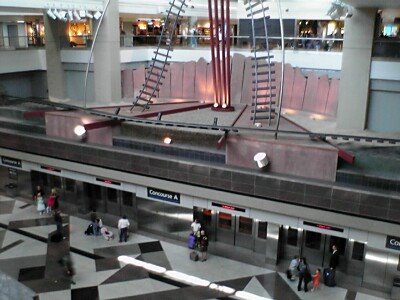
You'll notice a picture of the Denver airport in the blog. I wanted to test this new function of Blogger. Setting up the integration was not as straight forward as they implied, but seems to work a little better than TextAmerica. Honestly, the problem is Sprint.
Blogger says to send them a picture and they will send you a claim code. Unfortunately, the claim code was sent as an image which my Sprint phone could not view. I had to forward the message Blogger sent to the phone to regular mail account. Sprint, however, does not actually e-mail pictures. What they do is send people an e-mail that tells them to go to Sprintpcs.com so they can see the picture that was uploaded. It's Sprint's way of saying "All you Picture belong to us." Once I logged into webmail, redirected to Sprint to get the message from Blogger, I could then log in to Blogger to associate my phone with the blog.
The only reson I mentioned that it works better than TextAmerica, is that TA is not able to capture the picture mail text from Sprint. As a result, anytime I send a picture to TA, I have to log in and edit the description. Blogger seems to have licked that problem.
Thursday, August 03, 2006
Tuesday, August 01, 2006
Google Maps Mobile
As you know, I love Google Maps! And now, I've got Google Maps on my phone!
I already have Rand McNally StreetFinder on the phone which is integreted with the phone's GPS system. (We understand, of course, that phones don't really use GPS, the use LBS.) This is a wonderful program as it is actually a client application, which makes it much more flexible than a standalone GPS device. It uses the location based services to locate the phone within a few hundred feet, and downloads the street and neighborhood info for that area. As a result of this download, I can start keying in a destination address, and the system will search memory first, and on the server if needed. Generally, it can find any address within half a dozen characters.
Now that it has both the current location and destination, it hands the data up to the server, which calculates the route, and downloads maps to the phone. Since it is constantly communicating with the server, the information is reasonably up to date, and I don't need to worry about updating the program. The downside is that it is a subscription based service, but at $4.95 a month, I can afford to run it for a long time before buying a real GPS.
I use a similar process to drive my Bunger Tracker system, though I let Google provide the maps, and skip the downloads.
Now to Google Maps Mobile: I stumbled upon http://www.google.com/gmm, which explained that if visited the site on my phone, I could download the application. There was a hardware compatibility list of supported phones, it did not show the cost of this service. I figured the only way to find out was to try it... and you know what?
Its free!
The bad news: no GPS integration. The good news: satellite images.
Monday, July 31, 2006
Starswarm
I just finished the book "Starswarm", by Jerry Pournell. Like most of the fiction I read, I got the book from the thrift store, which means it was about ten years old. Since it was set in the future, on another planet, that was not a major concern. Actually, the technology held its own, ever after a decade. As a matter of fact, it was probably pretty visionary in 1995, and significantly more believable today.
When my wife saw the book, she thought the title was Starswarm, and was a part of the Skywalker saga. I explained that she was thinking about the story of a soldier, who took a young boy to live with his uncle, so he would not be found by the agent of an evil emperor, who had arranged the death of the boy's father. This book was the story of a soldier who took a young boy from his uncle, who was an evil emperor, and had arranged the death of the boy's father. Completely different.
To emphasis the differences, in Star Wars, the evil emperor could not have ordered his agent to kill the boy's father, for the agent was the boy's father. In Starswarm, the emperor did not order the agent to kill the boy's father, because the emperor was not evil, it was the agent who was evil, and killed the boy's father by order of a another emperor. Got it?
So anyway. They story was completely irrelevant to me when I bought the hardback book for sixty cents. What interested my was the type setting. The book was written in three different fonts.
The boy's mother was a member of the ruling family of the planet, but was also a computer scientist. She had the child implanted with satellite uplinked nuero transmitters, which linked his brain back an AI entity, which existed in the planetary mainframe. When the computer would talk to the boy, the computers quotations were in courier font. The boy would concentrate to communicate with the computer, and his thoughts were in an italicized, underlined, font. All third person action was a normal font. Interesting concept.
It was a good read.
Subscribe to:
Posts (Atom)